If you're having problems with the controls in
 on the PC, here are some tips to help you out. Visit the 5.6 Keyboard Controls section for more information about the default keyboard control configuration.
I can't get my joystick/gamepad working in the game properly, or at all!
- Unfortunately, joystick/gamepad support in is poor and does not work very well. You are better off using the joystick profiler program that came with your device. These programs let you map keys on the keyboard to controls on your joystick/gamepad.
If your device did not come with profiler software, or the software does not let you create your own custom profiles, there is a free generic profiler program you can download. It's called Joy2Mouse.
Detailed instructions on how to use Joy2Mouse can be found here.
If you have a Logitech joystick/gamepad, be sure to download the latest Wingman game profiler software.
When I try using my joystick/gamepad with the Wingman profiler in
, it doesn't work right!- There seems to be a problem with the Wingman profiler software . . . the option to apply profiles automatically, based on the game you select and launch, doesn't always work.
If this happens to you, do the following:
- Run the Wingman profiler. Make sure your joystick or gamepad is the selected gaming device, on the Select A Device drop-down field.
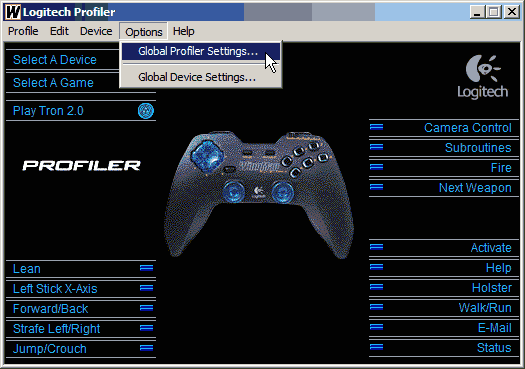
- Go to the Options menu and select Global Profiler Settings.
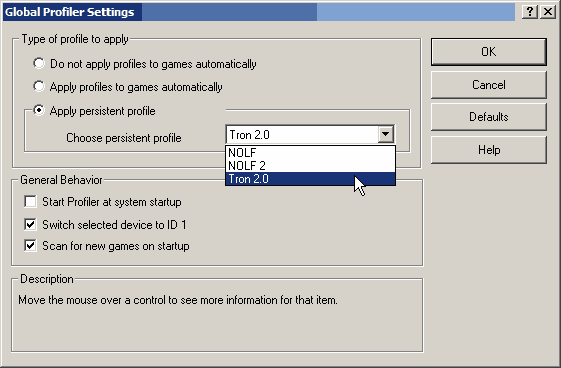
- Select Apply persistent profile, and choose the profile you created for from the drop-down menu.
- Click OK and run the game. Your joystick or gamepad should now work properly. Don't forget that this profile will now be permanently in effect until you change it again.
- Run the Wingman profiler. Make sure your joystick or gamepad is the selected gaming device, on the Select A Device drop-down field.
The game doesn't remember the bindings I set for the buttons and axes, on my joystick or gamepad!
- There is definitely a bug in the game, where it sometimes forgets the changes you make to your control setup, on your joystick or gamepad. Hopefully, a future patch will fix this problem.
UPDATE: This seems to have been fixed with the v1.042 patch.
I can't do a quick look to the left or right in light cycle races!
- That's right, there's no feature that allows you to quickly glance left or right. You have to use the mouse to look around. Sucks, doesn't it? Again, let's hope a future patch addresses this oversight.
I hate dealing with the camera!
- You can use the semicolon ; key to lock the camera into a forward looking position. The apostrophe ' key will switch between 1st-person and 3rd-person views. It might surprise you to know, that the plus + and minus - keys, or mouse wheel, will zoom in and out on your light cycle. That way, you can zoom out to get a better look at the grid, if you want.