nHancer/RadeonPro: Useful tools for Tron 2.0 and other games
Posted: Thu Jul 01, 2010 2:06 pm
If you want to get the best graphics quality and have full control over how your games look and perform, you really need to check out nHancer and RadeonPro.
For a long time, nVidia card owners have had nHancer and there was no real equivalent for ATI cards. But now RadeonPro has arrived and does the same thing.

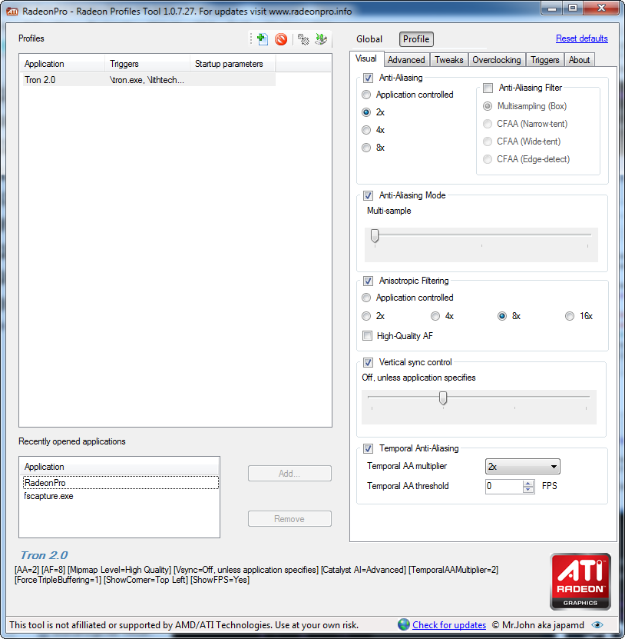
These tools allow you to force games to use whichever settings you prefer. You can set the level and type of anti-aliasing, vsync on and off, triple buffering, and so on. This comes in very handy when you want to achieve the best trade-off between graphics quality and performance, or even simply getting the games to work properly.
Both work on XP/Vista/7. Both require the .NET framework in order to run. If you're using Windows 7, then you automatically have a recent version of .NET. If you're on XP or Vista, you may need to download and install the latest version.
EDIT: I've acquired an nVidia card lately, but I can't give much advice about using nHancer because the program doesn't work with recent nVidia drivers. Most of what I know has been heard second-hand.
For a long time, nVidia card owners have had nHancer and there was no real equivalent for ATI cards. But now RadeonPro has arrived and does the same thing.
These tools allow you to force games to use whichever settings you prefer. You can set the level and type of anti-aliasing, vsync on and off, triple buffering, and so on. This comes in very handy when you want to achieve the best trade-off between graphics quality and performance, or even simply getting the games to work properly.
Both work on XP/Vista/7. Both require the .NET framework in order to run. If you're using Windows 7, then you automatically have a recent version of .NET. If you're on XP or Vista, you may need to download and install the latest version.
EDIT: I've acquired an nVidia card lately, but I can't give much advice about using nHancer because the program doesn't work with recent nVidia drivers. Most of what I know has been heard second-hand.
- The nVidia profile for Tron 2.0 that you use in nHancer isn't pointing to Lithtech.exe, which will prevent nHancer from working properly and your settings will be ignored.
- I've been told that Triple Buffering must be enabled for anti-aliasing to work in Tron 2.0 on nVidia cards. Don't know if this is true or not.
- Click the button with an icon the looks like a couple of gears (which will take you into the program settings), select the Advanced tab, and put a checkmark in the box labelled "Disable API detection for non-profile games" if it isn't checked already.
- In the Launchers tab of the Tron 2.0 profile that you create you need to select Custom and add TRON.exe, and in the Triggers tab add Lithtech.exe.
- If you choose anything other than the Multi-sample type of anti-aliasing, it may cause glitches in the graphics of Tron 2.0. Specifically, certain geometry will become transparent or invisible. The most obvious cases where you'll notice this are with Thorne, the Seeker, and sometimes the Rectorscripts and even Jet in cutscenes.
