is it possible to create an object that can be pushed along a set path?
minecraft castle
- floven1
- Registered users

- Posts: 154
- Joined: Mon Oct 12, 2009 7:22 am
- Do you own a copy of Tron 2.0?: Yes
- What is your favorite Tron character color?: Blue
- What type of multiplayer do you like to play?: Deathmatch
minecraft castle
another map
is it possible to create an object that can be pushed along a set path?


mental block
no sig comes to mind
end of line
no sig comes to mind
end of line
- xistence
- [LDSO] Site Admin
![[LDSO] Site Admin [LDSO] Site Admin](./images/ranks/site_administrator.png)
- Posts: 848
- Joined: Tue Jan 11, 2005 12:56 am
- Location: Germany
- Contact:
Re: minecraft castle
Right out of my RAM, as a hint:
- KeyFramer
- Key
- Brush ->bindTo-> Worldmodel
use WorldModel in KeyFramer
use Keys in KeyFramer to build path. That's the way. Try it, for a more detailed answer i would need to have a look into Dedit. You should also refer the docs coming with the tools, KeyFramer are explained (poorly) there, especially about the naming convention of Keys (first Key must be <name>0, next <name>01 and all following just increasing the number: <name>02, <name>03. Otherwise it won't work)
- KeyFramer
- Key
- Brush ->bindTo-> Worldmodel
use WorldModel in KeyFramer
- floven1
- Registered users

- Posts: 154
- Joined: Mon Oct 12, 2009 7:22 am
- Do you own a copy of Tron 2.0?: Yes
- What is your favorite Tron character color?: Blue
- What type of multiplayer do you like to play?: Deathmatch
Re: minecraft castle
kay, thanks xistence, i also expect to post alot of texture problems in here as i have, to this point, only used game textures, i have no idea how to pack my maps as rez files or make textures work ingame (my last attempt failed horribly).
mental block
no sig comes to mind
end of line
no sig comes to mind
end of line
- TronFAQ
- [LDSO] Member
![[LDSO] Member [LDSO] Member](./images/ranks/ldso_member.png)
- Posts: 3022
- Joined: Tue Jan 11, 2005 12:50 am
- Do you own a copy of Tron 2.0?: Yes
- What is your favorite Tron character color?: Cyan
- What type of multiplayer do you like to play?: Deathmatch
- Location: Ontario, Canada
- Contact:
Re: minecraft castle
If you use any custom textures, sounds, etc. they need to be included with your map. The easiest way to do it is by putting them in a .REZ file. A .REZ is just a convenient container for holding all the files that go together, that make up your map. (I know you know all this, I'm just repeating it for the sake of others who might be starting out.)
When you put your map, textures, sounds, etc. in the .REZ, you have to recreate the exact same folder structure as inside your Game folder where you're storing your map, textures, sounds, etc. for use with DEdit.
So say your compiled map is at "Tron 2.0\Game\WORLDS\RETAILMULTIPLAYER\DEATHMATCH\My_Map.DAT".
Inside the .REZ, it needs to be placed at "WORLDS\RETAILMULTIPLAYER\DEATHMATCH\My_Map.DAT". You create folders in the .REZ and put your map in the same place.
If you have a custom texture at "Tron 2.0\Game\TEX\PROTOTYPE\My_Texture.DTX" you put it at "TEX\PROTOTYPE\My_Texture.DTX" inside the .REZ.
If there's a custom sound at "Tron 2.0\Game\SND\EVENT\My_Sound.WAV" you put it at "SND\EVENT\My_Sound.WAV" inside the .REZ.
The easiest way to create a .REZ and put your files inside it is to use Winrez LT. You can get Winrez from my files page.
When you put your map, textures, sounds, etc. in the .REZ, you have to recreate the exact same folder structure as inside your Game folder where you're storing your map, textures, sounds, etc. for use with DEdit.
So say your compiled map is at "Tron 2.0\Game\WORLDS\RETAILMULTIPLAYER\DEATHMATCH\My_Map.DAT".
Inside the .REZ, it needs to be placed at "WORLDS\RETAILMULTIPLAYER\DEATHMATCH\My_Map.DAT". You create folders in the .REZ and put your map in the same place.
If you have a custom texture at "Tron 2.0\Game\TEX\PROTOTYPE\My_Texture.DTX" you put it at "TEX\PROTOTYPE\My_Texture.DTX" inside the .REZ.
If there's a custom sound at "Tron 2.0\Game\SND\EVENT\My_Sound.WAV" you put it at "SND\EVENT\My_Sound.WAV" inside the .REZ.
The easiest way to create a .REZ and put your files inside it is to use Winrez LT. You can get Winrez from my files page.
- floven1
- Registered users

- Posts: 154
- Joined: Mon Oct 12, 2009 7:22 am
- Do you own a copy of Tron 2.0?: Yes
- What is your favorite Tron character color?: Blue
- What type of multiplayer do you like to play?: Deathmatch
Re: minecraft castle
is the alpha mask just another layer in paint.net?
or do i have to do something special to it?
mental block
no sig comes to mind
end of line
no sig comes to mind
end of line
- xistence
- [LDSO] Site Admin
![[LDSO] Site Admin [LDSO] Site Admin](./images/ranks/site_administrator.png)
- Posts: 848
- Joined: Tue Jan 11, 2005 12:56 am
- Location: Germany
- Contact:
Re: minecraft castle
In most graphic programs the 'alpha mask' can also be named as 'alpha channel' or only 'mask', so 'technically' it is not another layer (only if the graphic program handle it this way, what doesn't happen very often).
Very often you have tools to create or draw a mask in a graphic program, or to generate a mask from another layer. Masks are shown as a dashed shape or as a coloring-overlay. You need to refer docs or tutorials related to the program you use, to find out how to do that, each program can be different in about where to find the button, hotkey or command to work with masks.
It is important that your graphic program can export your textures into the right fileformat, and it is also important that it can include the 'alpha chanel' or 'mask' as alpha mask into it. Be aware: not every fileformat uses an 'alphamask', so don't expect it everywhere as option during export!
For Dedit and textures under Dedit, i recommen to use the TGA fileformat, as it is the most compact form if working with textures. You also can/have to use PCX fileformat in some special cases. I recommen to export some textures in Dedit into TGA/PCX just to see how it looks in your graphic program.
As some further hints, where to keep an eye at while working with textures:
- Textures need a size in width or height that is based on the power of 2 (8,16,32,64,128,.etc). Smallest size possible is 8, largest is 1024. Any other size (3, 2048, 127,...) in width or height is not accepted by Dedit.
- Sometimes Dedit can bothering you about a 'wrong size', also you are sure they must be right: in that case the color-depth (also technically a 'size') is wrong. In most times you have a 24-bit (RGB) color-depth but you need a 8-bit (grayscale) while exporting a texture.
This is just the basic, there is much more to say, you're welcome to ask.
Very often you have tools to create or draw a mask in a graphic program, or to generate a mask from another layer. Masks are shown as a dashed shape or as a coloring-overlay. You need to refer docs or tutorials related to the program you use, to find out how to do that, each program can be different in about where to find the button, hotkey or command to work with masks.
It is important that your graphic program can export your textures into the right fileformat, and it is also important that it can include the 'alpha chanel' or 'mask' as alpha mask into it. Be aware: not every fileformat uses an 'alphamask', so don't expect it everywhere as option during export!
For Dedit and textures under Dedit, i recommen to use the TGA fileformat, as it is the most compact form if working with textures. You also can/have to use PCX fileformat in some special cases. I recommen to export some textures in Dedit into TGA/PCX just to see how it looks in your graphic program.
As some further hints, where to keep an eye at while working with textures:
- Textures need a size in width or height that is based on the power of 2 (8,16,32,64,128,.etc). Smallest size possible is 8, largest is 1024. Any other size (3, 2048, 127,...) in width or height is not accepted by Dedit.
- Sometimes Dedit can bothering you about a 'wrong size', also you are sure they must be right: in that case the color-depth (also technically a 'size') is wrong. In most times you have a 24-bit (RGB) color-depth but you need a 8-bit (grayscale) while exporting a texture.
This is just the basic, there is much more to say, you're welcome to ask.
- floven1
- Registered users

- Posts: 154
- Joined: Mon Oct 12, 2009 7:22 am
- Do you own a copy of Tron 2.0?: Yes
- What is your favorite Tron character color?: Blue
- What type of multiplayer do you like to play?: Deathmatch
Re: minecraft castle
what about in paint.net? can i use paint.net to create an alpha mask or do i need to use a more advanced image manipulation program?
EDIT: i need to make an area that has parts of the texture missing, like the glass blocks in minecraft
or a single plane ladder with no texture between the rungs
how can i do that?
another EDIT: how can i dimm the default no-lighting-applied brightness?
i see working textures
i also see a need for rez files
and i also see that lighting in tron 2.0 is quite different than minecraft :O
had to duplicate the entire 810 meg TEX folder to do it but i did it
but i still got well over a hundred gigabytes free on my hard drive so thats alright
EDIT: i need to make an area that has parts of the texture missing, like the glass blocks in minecraft
or a single plane ladder with no texture between the rungs
how can i do that?
another EDIT: how can i dimm the default no-lighting-applied brightness?
i see working textures
i also see a need for rez files
and i also see that lighting in tron 2.0 is quite different than minecraft :O
had to duplicate the entire 810 meg TEX folder to do it but i did it
mental block
no sig comes to mind
end of line
no sig comes to mind
end of line
- xistence
- [LDSO] Site Admin
![[LDSO] Site Admin [LDSO] Site Admin](./images/ranks/site_administrator.png)
- Posts: 848
- Joined: Tue Jan 11, 2005 12:56 am
- Location: Germany
- Contact:
Re: minecraft castle
Lots of questions...
Paint.net: Don't know, i'm not working with it as it is not like Adobe Photoshop or Corel Photopaint. Most programs have equal options these days, you might want to look for something that is called 'Mask', 'Alphamask', 'Alphalayer' or 'Alphachannel' (or comparable). Otherwise you need to find out by yourself, or someone else can answer this.
There are other advanced programs like: Gimp(Freeware), Photoshop($$), Photopaint($$), etc. Google or try Wikipedia, to get an overview of graphic programs.
Making 'holes' in textures: As said, use alphamask. The alphamask can be build by grayscaled image data, or with specific tools inside of the graphic program. It depends on which program you finally use, how you define the mask. Some programs can 'show' the alphamask as a grayscaled layer or comparable. To make things transparent, they must be dark () otherwise they must be bright.
Controling the 'glow' factor (if it is that what you ment): Alphamask again. The lighter the alphamask, the more glow. Logical, because only that can 'glow' that is 'visible'. In the case of Dedit, you need to 'switch on' the glow effect while configuring the texture itself, otherwise: no glow. Other engines/editors might use different 'techniques', most times they define 'material', a bit trickier to handle, as you have to deal with shader already at this point.
Paint.net: Don't know, i'm not working with it as it is not like Adobe Photoshop or Corel Photopaint. Most programs have equal options these days, you might want to look for something that is called 'Mask', 'Alphamask', 'Alphalayer' or 'Alphachannel' (or comparable). Otherwise you need to find out by yourself, or someone else can answer this.
There are other advanced programs like: Gimp(Freeware), Photoshop($$), Photopaint($$), etc. Google or try Wikipedia, to get an overview of graphic programs.
Making 'holes' in textures: As said, use alphamask. The alphamask can be build by grayscaled image data, or with specific tools inside of the graphic program. It depends on which program you finally use, how you define the mask. Some programs can 'show' the alphamask as a grayscaled layer or comparable. To make things transparent, they must be dark () otherwise they must be bright.
Controling the 'glow' factor (if it is that what you ment): Alphamask again. The lighter the alphamask, the more glow. Logical, because only that can 'glow' that is 'visible'. In the case of Dedit, you need to 'switch on' the glow effect while configuring the texture itself, otherwise: no glow. Other engines/editors might use different 'techniques', most times they define 'material', a bit trickier to handle, as you have to deal with shader already at this point.
- TronFAQ
- [LDSO] Member
![[LDSO] Member [LDSO] Member](./images/ranks/ldso_member.png)
- Posts: 3022
- Joined: Tue Jan 11, 2005 12:50 am
- Do you own a copy of Tron 2.0?: Yes
- What is your favorite Tron character color?: Cyan
- What type of multiplayer do you like to play?: Deathmatch
- Location: Ontario, Canada
- Contact:
Re: minecraft castle
Paint.NET is more than adequate. I've recommended it in the past, and it does support Alpha masks in images.
- floven1
- Registered users

- Posts: 154
- Joined: Mon Oct 12, 2009 7:22 am
- Do you own a copy of Tron 2.0?: Yes
- What is your favorite Tron character color?: Blue
- What type of multiplayer do you like to play?: Deathmatch
- floven1
- Registered users

- Posts: 154
- Joined: Mon Oct 12, 2009 7:22 am
- Do you own a copy of Tron 2.0?: Yes
- What is your favorite Tron character color?: Blue
- What type of multiplayer do you like to play?: Deathmatch
Re: minecraft castle
i ment my maps are too bright when compiled without lighting, i need to fix thisxistence wrote:Lots of questions...
...Controling the 'glow' factor (if it is that what you ment): Alphamask again. The lighter the alphamask, the more glow. Logical, because only that can 'glow' that is 'visible'. In the case of Dedit, you need to 'switch on' the glow effect while configuring the texture itself, otherwise: no glow. Other engines/editors might use different 'techniques', most times they define 'material', a bit trickier to handle, as you have to deal with shader already at this point.
mental block
no sig comes to mind
end of line
no sig comes to mind
end of line
- xistence
- [LDSO] Site Admin
![[LDSO] Site Admin [LDSO] Site Admin](./images/ranks/site_administrator.png)
- Posts: 848
- Joined: Tue Jan 11, 2005 12:56 am
- Location: Germany
- Contact:
Re: minecraft castle
Don't get me wrong, and for sure i don't want to sound too precocious, but notice this: you can be sure we're always there to help, but hopefully you tried to google for some tutorials about doing some 2D stuff or how to use Paint.NET, did you? If not, this might be a start:floven1 wrote:how do i do it in paint.net?
- http://en.wikibooks.org/wiki/Paint.NET/ ... /Tutorials
- http://sidneys1.deviantart.com/art/Pain ... -146323137
- http://www.youtube.com/watch?v=Xyt7wGgZgv0
(just a few direct hits for a few second search under 'paint.net alpha mask')
And i recommen: learning by doing, that creates a better understanding about things. As said, this should be just a constructive, good ment advise. Feel free to ask.
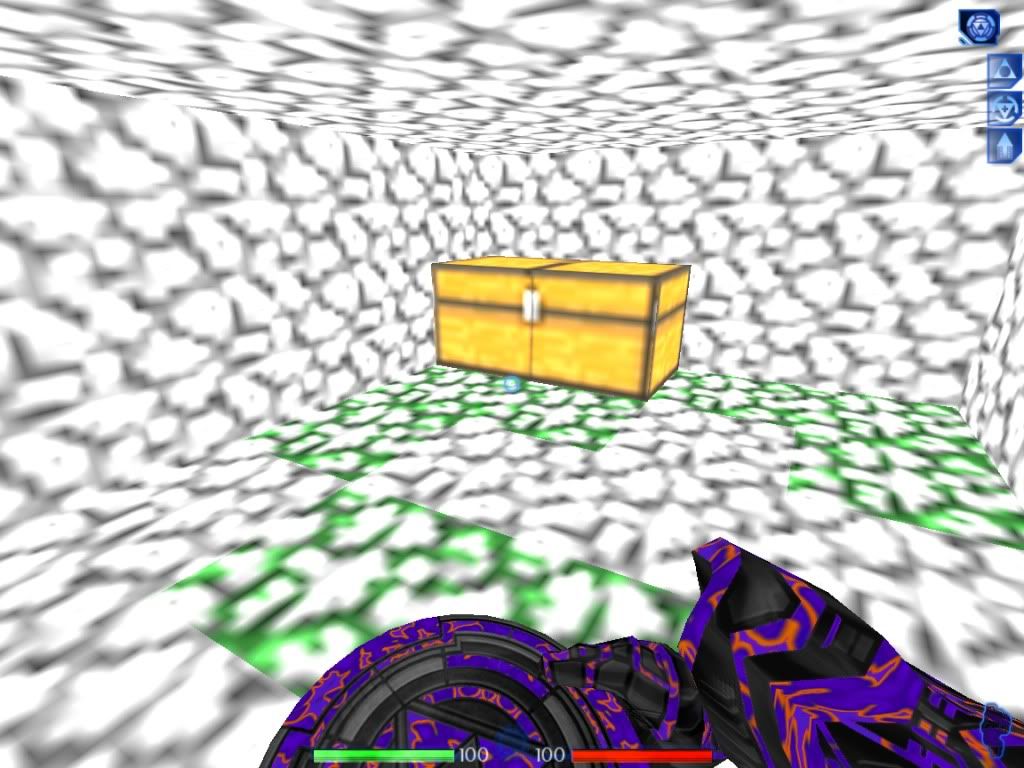
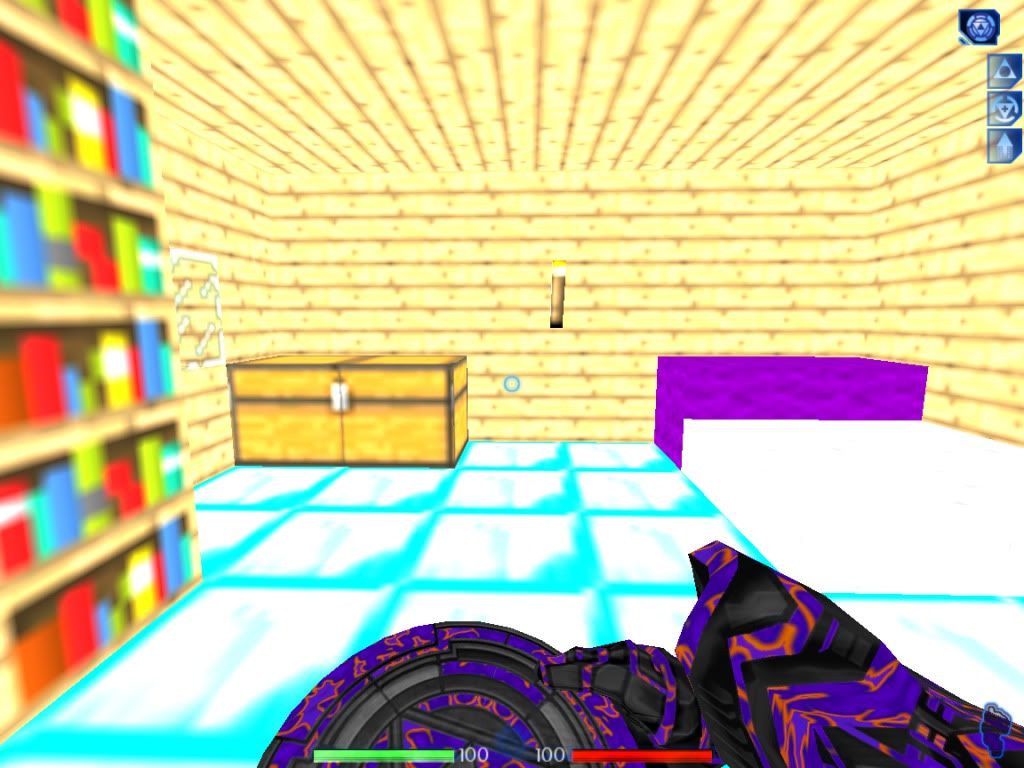
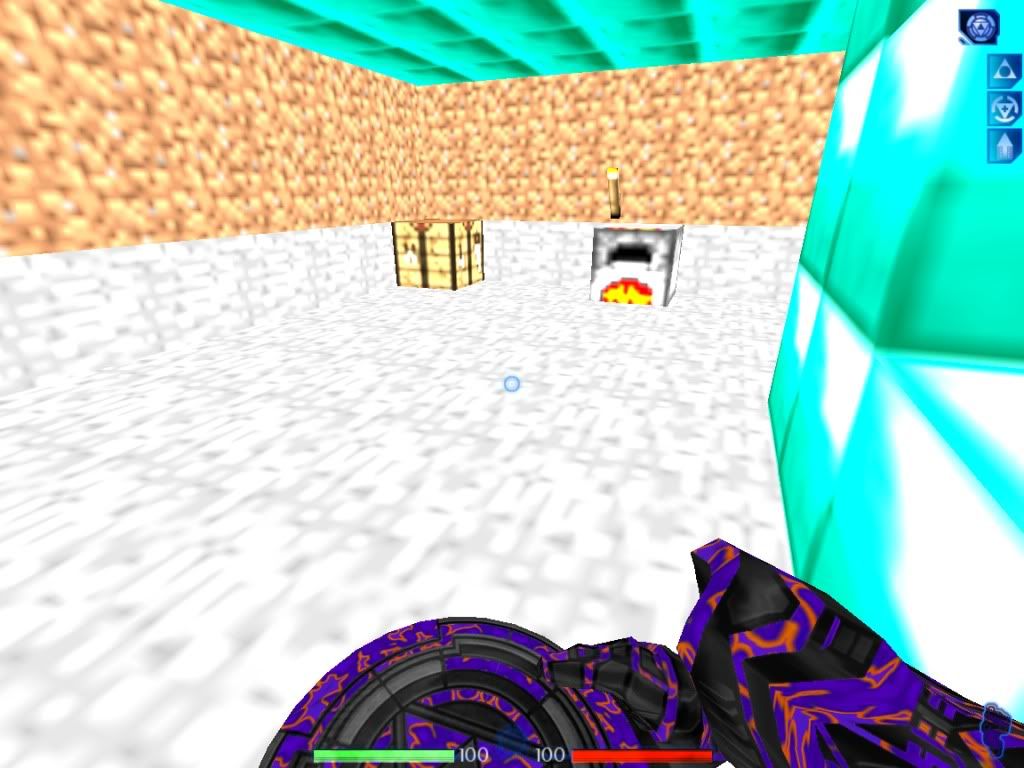
Maybe you post a screenshot about what you mean? Are there textures visible being bright, or is everything just white and gray? So far it sounds more like a bug or wrong built map.floven1 wrote:i ment my maps are too bright when compiled without lighting, i need to fix this
- floven1
- Registered users

- Posts: 154
- Joined: Mon Oct 12, 2009 7:22 am
- Do you own a copy of Tron 2.0?: Yes
- What is your favorite Tron character color?: Blue
- What type of multiplayer do you like to play?: Deathmatch
Re: minecraft castle
btw, is there a way to make pixels not blend into each other?
in other words, i want to eliminate the gradient between different-colored pixels on textures
mental block
no sig comes to mind
end of line
no sig comes to mind
end of line
- floven1
- Registered users

- Posts: 154
- Joined: Mon Oct 12, 2009 7:22 am
- Do you own a copy of Tron 2.0?: Yes
- What is your favorite Tron character color?: Blue
- What type of multiplayer do you like to play?: Deathmatch
Re: minecraft castle
here are those screenshots you asked for btw


it looks like a hotel room on the sun doesnt it?


it looks like a hotel room on the sun doesnt it?
mental block
no sig comes to mind
end of line
no sig comes to mind
end of line
- floven1
- Registered users

- Posts: 154
- Joined: Mon Oct 12, 2009 7:22 am
- Do you own a copy of Tron 2.0?: Yes
- What is your favorite Tron character color?: Blue
- What type of multiplayer do you like to play?: Deathmatch
Re: minecraft castle
so, bind the sliding object to a worldmodel and bind that worldmodel to the keyframer, then bind keys to keyframer?xistence wrote:Right out of my RAM, as a hint:
- KeyFramer
- Key
- Brush ->bindTo-> Worldmodel
use WorldModel in KeyFrameruse Keys in KeyFramer to build path. That's the way. Try it, for a more detailed answer i would need to have a look into Dedit. You should also refer the docs coming with the tools, KeyFramer are explained (poorly) there, especially about the naming convention of Keys (first Key must be <name>0, next <name>01 and all following just increasing the number: <name>02, <name>03. Otherwise it won't work)
and will the object turn when pushed around a corner?
and how can i make it player-pushable?
mental block
no sig comes to mind
end of line
no sig comes to mind
end of line